01
11 frame bawaan
Pilih frame dengan 1 sampai 9 foto, lalu langsung mulai memotret.

Pilih frame, berpose mengikuti hitungan mundur, lalu simpan hasilnya. Tanpa pasang aplikasi, tanpa daftar akun. Pakai Custom Frame untuk menyesuaikan warna dan dekorasi dengan suasana acara.
KlikFoto
Dirancang untuk iPad dalam posisi mendatar, dan tetap nyaman di HP maupun laptop.
01
Pilih frame dengan 1 sampai 9 foto, lalu langsung mulai memotret.
02
Pilih 1–4 foto, satu dari 8 warna frame, dan satu preset dekorasi dengan logo KlikFoto.
03
Lihat hasil resolusi penuh, ulangi foto tertentu kalau perlu, lalu download atau pindai QR di HP.
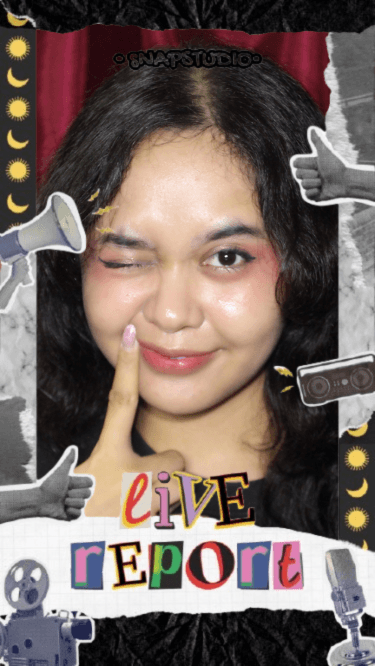
Contoh hasil
Contoh ini menunjukkan bagaimana satu preset dekorasi bisa membentuk tampilan lengkap tanpa harus menata setiap hiasan satu per satu.
Pilih frame bawaan atau Custom Frame.
Ikuti hitungan mundur dan ambil setiap foto.
Periksa hasil, ulangi foto yang kurang pas, lalu simpan.
Tips praktis soal pose, cahaya, frame, cetak, persiapan iPad, privasi, dan menjalankan booth di acara.
Panduan lengkap memakai KlikFoto dari membuka halaman sampai menyimpan photo strip, termasuk pilihan frame, filter, retake, dan cara berbagi.
3 menit bacaKumpulan ide pose untuk sendiri, berdua, dan rombongan, dikelompokkan berdasarkan jumlah foto di frame: 1, 2, 3, 4, 6, dan 9 foto.
2 menit bacaCara mengatur cahaya untuk kamera HP, iPad, atau webcam supaya wajah terang dan tajam tanpa membeli lampu studio.
2 menit bacaPerbandingan semua frame KlikFoto berdasarkan jumlah foto dan ukuran file, plus kapan sebaiknya memakai Custom Frame.
2 menit bacaPersiapan perangkat, posisi, pengaturan booth, penyimpanan, dan cara berbagi foto supaya photobooth swalayan berjalan lancar dari awal sampai akhir acara.
2 menit bacaPenjelasan jujur tentang izin kamera, penyimpanan lokal, kapan foto diunggah, dan cara menghapus data di KlikFoto.
2 menit bacaLangkah memperbaiki izin kamera di Safari iPhone dan iPad, Chrome Android, dan browser laptop, plus penyebab lain yang sering terlewat.
2 menit bacaLangkah praktis mengubah iPad menjadi photobooth swalayan yang aman dipakai tamu tanpa diawasi terus-menerus.
3 menit bacaUkuran cetak yang tepat untuk setiap frame KlikFoto, cara mencetak dua strip di satu kertas 4R, dan tips supaya warna hasil cetak tidak mengecewakan.
2 menit bacaPerbandingan jujur antara photobooth berbasis browser seperti KlikFoto dan jasa sewa photobooth, termasuk kelebihan dan keterbatasan masing-masing.
Buat photo strip pertamamu sekarang.
Mulai Foto